Tuesday, March 8, 2016

Regularity

What is the most effective way to increase your output? I think that is regularity. Making something every week, no matter how busy or tired you are, no matter how little you want to do it.
I have to admit, this week is hard. I am flat out working towards a looming deadline, with several other work related checkpoints impending. But here I am. Writing a blog post.

In a way, it seems like I am trying to check off another thing on a list fast growing out of control, but then again, there is something more. I considered letting one week slip, maybe wait until the deadline is past, wait until things settle down again. But then I realized, you know, that is never going to happen. You give an inch, you give a mile. Before long the blog dies again, and with it, a precious little part of my week. So I started writing.

This post isn't about Blender, or art even specifically. It is about life. Time is precious, but so also are many other things, and if you don't spend a little of your invaluable time on them, they vanish. Balancing work and hobbies is tough, but I can tell you one thing. If you don't balance them, your job will do the balancing for you.

So maybe, take a few minutes this week. Do something you love, take a break. Life is only as good as you make it.

Next week, I'll be here.

Tuesday, March 1, 2016

AnimationMarch is underway!

Today is a big day! Animation March was just launched, and we are all scurrying to complete the first challenge, "Appearing Text". To view all the topics and more details, visit the event page here: https://agenzasbrothers.com/en/animationmarch-2016/


I will be posting my results on this blog, instead of the every Wednesday posts I have been doing. We will return to that schedule in April after this event is completed.

Wednesday, February 24, 2016

GPU vs. CPU - Blender Cycles Fire

The new 2.77 pre-release now has support for GPU rendering of smoke and fire, so I am going to put it to the test and see how it stacks up against CPU rendering in a variety of situations. Below are my specifications:

- NVIDIA GeForce GTX 980
- Intel Core i7 at 3.07 GHZ (8 threads)

I had been keeping up to speed on the subject, reading articles on BlenderArtists and such, and there were some objections raised that gave me concerns that GPU might be slower than CPU because of how the smoke was handled, but those fears were completely put to rest with the first test scene. My GPU got a very respectable time of 2:12.84  while the CPU  hit the three minute mark 25% of the way through, and only 1/3 of the way through the intensive portion.


I was also amazed at the relative viewport performance, as the GPU maintained a decent view at all times, while the CPU had major issues, sampling much slower and not updating as quickly. In this video you can see the comparison from GPU (first) to CPU (second). Note that this is also while using a GPU hardware based recording software.

Overall, I am extremely excited to see what will come of this latest extremely valuable addition to the Cycles render engine.

Wednesday, February 17, 2016

Getting inspiration for CG artowrk

One thing I get asked a lot, and see other people asked a lot is how do you get inspired, what makes it possible for you to make artwork like this? We will be going over a few general points, that should get you well on your way.


1. Real Life

It is easy with CG work to get artistically disconnected with the real world, retreating into the corners of the web where epic fantasy digital paintings and fantastic creatures reside. Places where reality, the real hard, meaningful parts of life are left behind. And because of this, the single most important part of storytelling. Relatability. 

The way to keep from making yet another generic scene, another generic character, is to give it soul, some taste of the real world the viewer can devour. A piece of a story, a narrative that is life. Because we can all relate with it, and powerfully. Take just a small, meaningful piece of your life and paint a picture around it. You will be amazed.

2. Other Art Disciplines

I find it amazingly inspiring to frequently view artworks made using different techniques, from photography, to painting, to carving, watchmaking, literally everything. Become fascinated with art for art's sake, and all your artworks will show the difference. 

Outside of Blender and the CG world, I am an avid photographer and videographer.
This is one of the most important aspects of being an artist. Having a wide and varied knowledge of many differing things gives you much more to draw inspiration from. You will find that the variety and complexity of your artworks flourishes. I am amazed how much a good knowledge of Photography and Videography are especially useful.

3. Just Make Something

I don't care how bad you are, or how awful it looks when completed. The things you will force yourself to learn by just doing something will stay with you and help you make your next artwork that much better. Never underestimate the power of practice. You never hear the story of all the failed attempts before the great successes of your favorite artists. 

When I started this project, I had no idea what I was going to make. I just started.
If you find yourself against a wall and literally can't think of anything to make, pick something on your desk. A pencil, a coin, a notepad; anything is good as another. This will get you started, and you might be surprised how much you can learn from it.

4. Always Keep Learning

No matter how long you have been working in the CG field, there is always something more you can learn. This may mean going out of your comfort zone and learning a new software package, learning scripting to help speed up your workflow, or any number of simpler things. 


I learned a lot about instancing, material nodes, and modelling from this project.
Everyday there is something to learn from even your current projects. And if you are not learning anything from your current projects you should consider ramping it up. Unless you do not know how to do something in your project your project is too easy. Quite often after learning a new technique or finding a new addon, I will come up with a project idea based on that new found ability that I otherwise would have completely missed

5. Start Writing

I find that writing and drawing helps me formulate my ideas, and something as simple as an accidental stroke can make a tremendous difference in the final outcome of the project, and can lead to results I would have otherwise not come up with. Something about the physical act of writing and drawing seems to help engage the mind and get ideas flowing.


Never underestimate the value of good planning. You need to know how to allocate your time and resources before you even start or you will find yourself getting bogged down.

6. Stick With It

I know it is nice to "get inspired" and have a project you really like working on, but eventually that wears off. Don't forsake your old project that is near completion to one that you feel like you like more. Once you have passed the planning stage, and have made an effective plan, you should know if you can or cannot complete the project. This is the time to set it aside if you are going to at all. If you wait until you are halfway through the project you will find you never come back to it, instead you will have to start all over again as the part you made previously will not be up to your standard. 

This image was inspired by spending morning breakfasts with my grandparents, looking out the kitchen window.
It helped me keep with the project and stay interested.
It is important to complete a project quickly or this starts to take effect. I can't tell you how many times I have read a post where someone, after over a year of work, has finally completed their project. They always mention how hard it was, because they kept wanting to go back and fix things, which ate up even more time. And eventually the fix will need to be fixed . . .  This is a really vicious cycle, but it doesn't need to be. You can usually decide if a project is too big or complex for you from the outset. The choice of will you or will you not on the other hand is a harder question. Just keep at it.  

7. Move

Get up, and go outside. Take a walk, and think. Ideas do not just show up. You have to chase them down.


--------------------------------------------------

I hope you guys enjoyed this, I know a lot of people have asked me about it. 
Please share if it has helped you :)


Wednesday, February 10, 2016

How to make an abstract polygonal wallpaper

This week I will be revisiting the techniques I used to create these artworks, and giving an overview of how to achieve this effect.

Main Concepts

One of the most critical parts of making an artwork like this is the lighting. You can use a set of lamps, or a good studio HDR. The important thing is to get a lot of contrasting light sources to give complex reflections and to add visual interest to otherwise solid polygons. 

To continue with the contrasting theme, we will also give the materials very contrasting colors. A high Depth of Field can also help add some more visual interest to the artwork.

Creating the Geometry 

1. Generating the base mesh

Start by adding a simple plane to your scene, and adding a Subdivision Surface modifier:


Next you will want to add a Decimate and a Displace modifier:


2. Creating the wire highlights

To do this, simply duplicate the mesh and move it upwards on the Z axis, and then add a Wireframe and Subdivision Surface modifier as shown (make sure to keep it below the displace modifier):

Make sure that 'Crease Edges' is checked

3. Adding the spheres at the joints

To do this we will just use a particle system set to emit from vertices and to show unborn particles. Start by adding a particle system and moving it up the modifier stack:


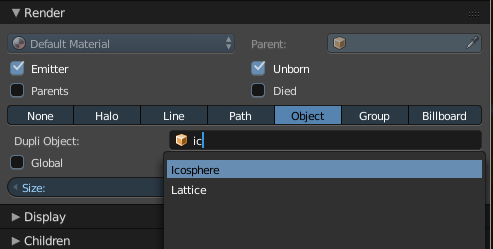
Now add an icosphere and go back to the particle system settings and add it as the duplication object:


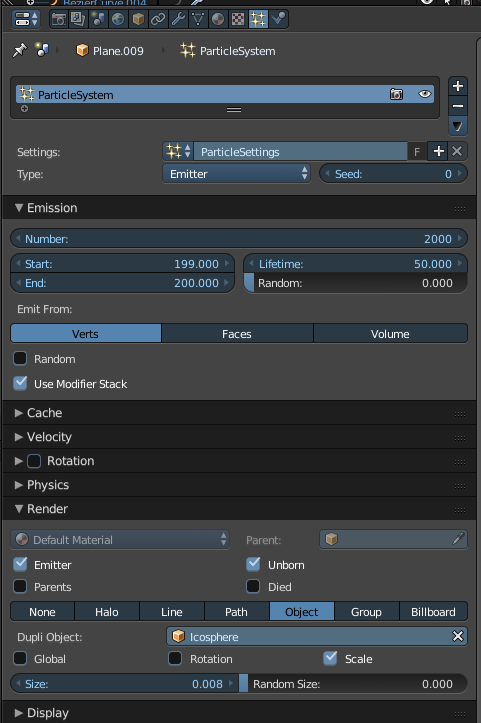
Change the particle settings as shown:


Adding materials and camera setup


Now we will add basic glossy materials, position the camera in a good position, and render the image out. Remember to add some DoF as well. Feel free to add a sphere with a different color to add a focal point to the image if so desired:


Wednesday, February 3, 2016

The Observatory House - Photoreal Environment Study

 View on ArtStation

To kick things off, I will be returning to a recent project and giving a few more interesting details about it. My inspiration for this was trying to make an architectural structure out of a basic primitive. For this particular project I chose a UV Sphere.

Like all projects, I wish I could have kept at it a little longer, but hey, whatever. Anyways, what I did first is make the base terrain mesh. The terrain is made using a basic noise displacement with object coordinates so I could use an empty to move the texture so it looked about right.

After I made the base terrain, I started working on blocking objects (water, really simple house, etc) and adding fine details to the house. This was a lot of fun, and as you can see the UV Sphere really dictated how the final structure ended up looking.


The panels are intended to shield from extreme sunlight in the day to keep the interior cool, as this is intended to be a very hot, arid country. The lattice window was made using a mixture of the decimate and wireframe modifiers. That was a little tricky to get right.

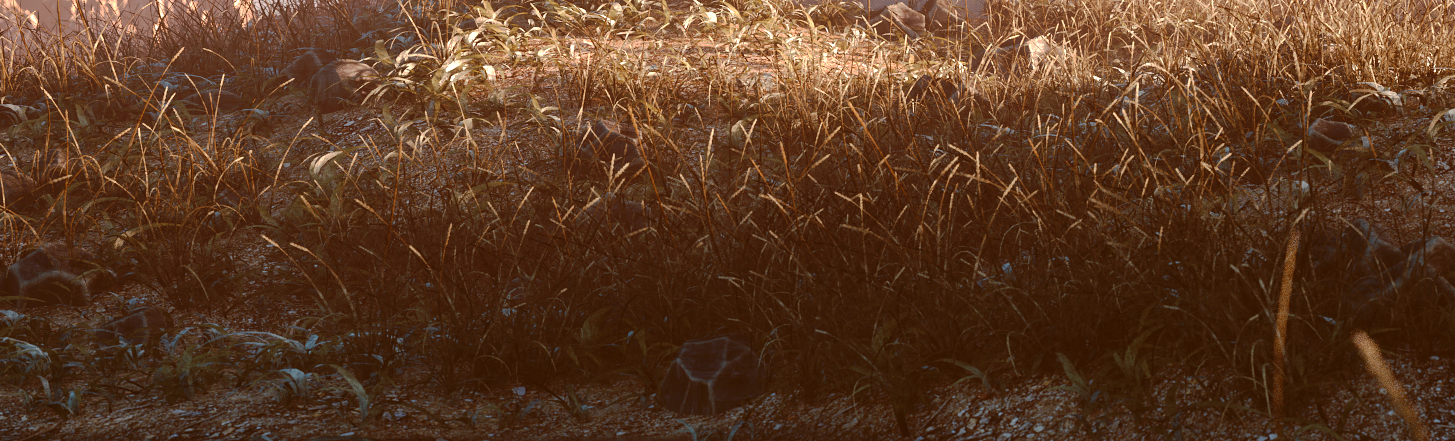
Next I moved on to modelling the grass, which wasn't real hard, probably around 45 minutes to get all the bunches. Then I added the material, which I fine tuned over the course of the project. I then moved on to making some procedurally modeled rocks, utilizing voronoi displacement and a few other tricks.


The last main modelling stage was to make the mountains (using the ANT landscape addon) and the willow tree. Although a little unhappy with the quality of the tree, I guess it came out alright.

The compositing was fairly straightforward, one of the main things I did was use film emulation, which kind of inspired the final composite style.

------------------------------------------------------

If you would like to see an article on a specific project, please feel free to leave a comment below!

If you have a project or lead you would like to submit for review to be used in an upcoming article, please let me know as well.

Monday, February 1, 2016